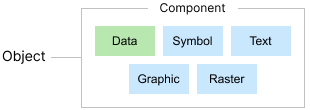
All data in dpPower is organized according to different types of objects that represent and describe the elements of NIS and GIS operations. It is at the object level that you work when documenting network elements or performing analysis, such as tracing connections or finding faults.
From a user perspective, an object can be a unique wire, cable, fiber or property that has geographic characteristics such as location and extent on the map, and its own attributes such as ID number, address, voltage level, height, cable type, pipe dimension, and so on.
The actual building blocks of dpPower however, are components. A database object is made up of one or more components that together describe the attribute data and geometry of the object. All components included in the same object have the same system ID.
We can use five types of components to build objects. Four of them are graphical components, which can be displayed in the graphical view: symbol, text, graphic and raster components. The fifth type is the data component, which has no graphics but contains other important information about the object.