Connects two objects, effectively linking them together as part of a topological network.
1.Select Edit > Object > Connect > Connect (J) or press  in the toolbar.
2.Select an object to connect.
3.Select an object to connect to the previous selected object.
|
Connection instructions and connection status is shown in the status bar at the bottom of the screen. |

|
It is also possible to select an object first, activate the function Connect and select an object to connect to. |

Connect three objects
Connects three objects, effectively linking them together as part of a topological network.
An example of this kind of connection is a branch in a schema as below:
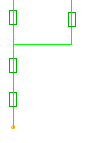
1.Select Edit > Object > Connect > Connect three objects (Shift - J) or press in the toolbar.
2.Select an object (A) to connect.
3.Select an object (B) to connect to object (A).
4.Select an object (C) to connect to object (A).