Velander calculations are used to estimate the diversified peak load in the network when the available customer load data is given as annual energy instead of measured power.
In many cases, customer data contains annual energy consumption from meters, while the network calculation requires a power value. The Velander method converts annual energy to an estimated active peak power by using predefined Velander constants. These constants describe the expected load behavior for different customer categories.
The purpose of the Velander calculation is not to calculate each customer’s exact maximum demand. Instead, it estimates the coincident or diversified load that the customer, or a group of customers, is expected to contribute to the network peak. This means that several customers connected to the same delivery point are not simply added as individual maximum loads. Their annual energy values are combined and recalculated using the Velander formula.
Power or energy as a base setting
When loads are imported from customer data, the system searches for customers connected to delivery points. This results in a total load for each delivery point included in the calculation.
The load data is collected from meters and can be available either as power or as annual energy. A calculation uses one load type per customer.
When starting a calculation, select a Parameter template with the load priority you want to use. In the parameter template, Priority controls whether Power or Energy is prioritized when both a power value and annual energy are available for the same customer.
If power data is selected or prioritized, the power value is used directly in the calculation without considering a coincidence factor. Power loads may also be given as monthly readings. These are added to the meter as the Meter reading component.
If annual energy is selected or prioritized, the system recalculates the annual energy into power by using the selected Velander table.
Velander tables
A Velander table contains the constants used to convert annual energy into estimated peak power. Several Velander tables can exist in the system, for example to support different calculation assumptions, regions, planning standards, or customer classification models.
When starting a calculation, select which Velander table should be used.
Customer categories and constants
The Velander constants are linked to customer categories. The customer category is determined by the ISIC code in the customer data.
Each customer category can be mapped to a set of Velander constants. These constants control how annual energy for that customer category is converted into power.
If the ISIC code is missing, or if the ISIC code is not mapped to any Velander constants, the system uses a default value.
Velander formula
When annual energy is used as load data, the diversified network load is calculated according to the Velander formula:

where:
|
– calculated active peak power (kW) for a given customer group. |
|
– the annual active energy consumption (kWh) for individual customer |
|
– the Velander constants for the customer category |


 within the customer category
 and
and 
For one customer the Velander formula is reduced to:  .
.
Administrate Velander constants
Velander constants and mappings between customer categories and constants are maintained in the codelists.
The following codelists are used:
•DIVERSITY_INDEX - Contains the Velander tables. Each table has a Diversity index (DNR) and a description. The DNR is used to associate constants and customer categories with the correct Velander table.
•DIVERSITY_CONST - Contains the Velander constants for a Velander table. Each entry has a DNR and a DPOST. The constant values are DCONST1, DCONST2, and COSFI.
•DIVERSITY_SNI_CODE - Maps a customer category to a constant entry. The customer category is specified in the SNI_CODE field. Depending on the terminology used in the installation, this corresponds to the ISIC, SNI, or SCB code. The DNR and DPOST fields specify which Velander table and which set of constants should be used.
Modify constant values or add a new set of constants
|
If you are unsure which DNR corresponds to the correct Velander table, open DIVERSITY_INDEX and check the table's DNR. |

1.Select Analyzer > Results/Administration > Administration > Start codelist manager.
2.Select the DIVERSITY_CONST codelist.
oTo modify constant values:
a.Locate the entry for the correct Velander table and set of constants. The Velander table is identified by DNR and the set of constants by DPOST.
b.Press Edit row  and make the required changes.
c.Press Save.
oTo add a new set of constants:
a.Press Add  .
.
b.Enter the required values.
|
DPOST is assigned automatically as a sequential number. |

|
If the entry should be used as the default when the customer's SNI_CODE is missing or is not mapped, set NOCAT = X. There should be no more than one default entry per Velander table. |
a.Press Save.
3.Press Update server.
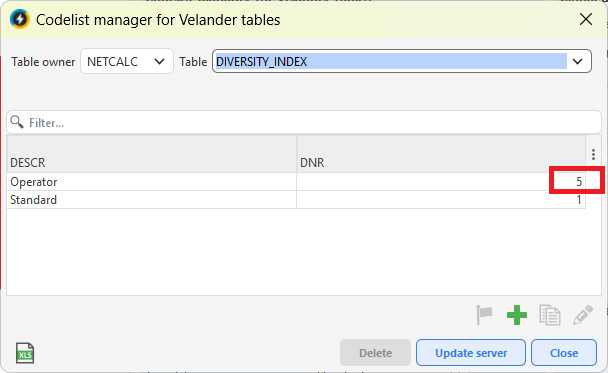
In the DIVERSITY_INDEX codelist, note the DNR of the Velander table you want to modify.
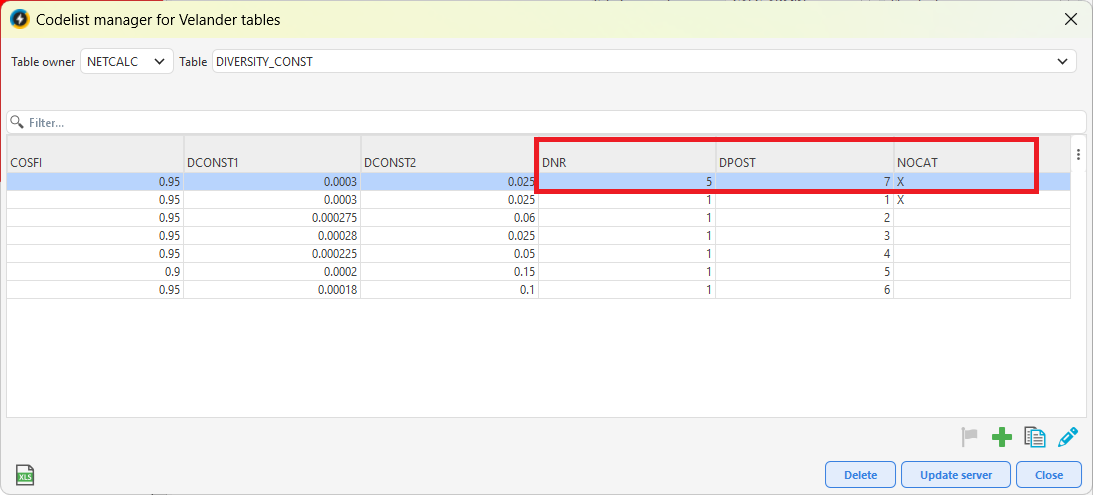
In the DIVERSITY_CONST codelist, locate the correct entry using DNR and DPOST. An X in the NOCAT field indicates that this entry is used as the default for the Velander table when SNI_CODE is missing.
Map a customer category to Velander constants
1.Select Analyzer > Results/Administration > Administration > Start codelist manager.
2.In the DIVERSITY_INDEX codelist, identify the DNR of the Velander table to be used.
3.In the DIVERSITY_CONST codelist, identify the DPOST for the set of constants that the customer category should use.
4.Select the DIVERSITY_SNI_CODE codelist.
5.Press Add .
6.Enter the same DNR as for the selected Velander table.
7.Enter the DPOST for the selected set of constants.
8.Enter the customer category in the SNI_CODE field.
|
SNI_NR is assigned automatically as a sequential number. |
9.Press Save.
10.Press Update server.
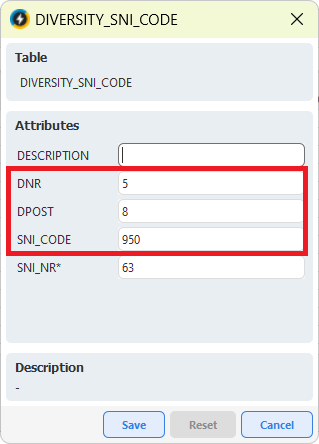
Enter the DNR and DPOST for the required Velander table and set of Velander constants. Enter the customer category in the SNI_CODE field.